Use Beyond Compare as a Git Diff/Merge Tool in OS X
- Comments:
- 11
Update 12/26/2013: The Mac Beta is now available and there is no reason to use WineBottler anymore. Instructions and an updated post are here!
I switched from Windows to Mac for work a little over a year ago (I've been using Macs at home for years) and there is one program I still could not live without - Scooter Software's wonderful Beyond Compare. I've tried every single diff tool available and none have lived up to Beyond Compare. It truly lives up to its name.
I've had Beyond Compare running in WineBottler for a while now, but was never able to get passing arguments to work correctly. Today I had a revelation. On creating the bottle it asks you for arguments to pass the executable, I had not provided any. Ends up it then passes the first argument as an empty string, which prevented the first argument being a file! Huzzah, an easy fix, pass it an innocuous argument! So here are some directions on getting it set up!
Beyond Compare Installation / Configuration
The first step is to download WineBottler if you don't already have it. Just drag the WineBottler.app and Wine.app into your /Applications directory. Then download the Windows version of the Beyond Compare Installer and hang onto it.
Launch WineBottler.app. In the left pane choose "Create Custom Prefixes", then for the Install File, choose the Beyond Compare Installer downloaded earlier. To my knowledge no Winetricks are necessary. Check the Self-contained checkbox to make a stand alone application.
IMPORTANT: WineBottler passes a blank argument if you leave the Runtime Arguments blank, which Beyond Compare interprets as the first filename - an annoying bug that took me months to figure out. To get around this we can pass it an innocuous argument (see arguments). I chose /nobackups because I don't want backups and they are turned off by default anyway.
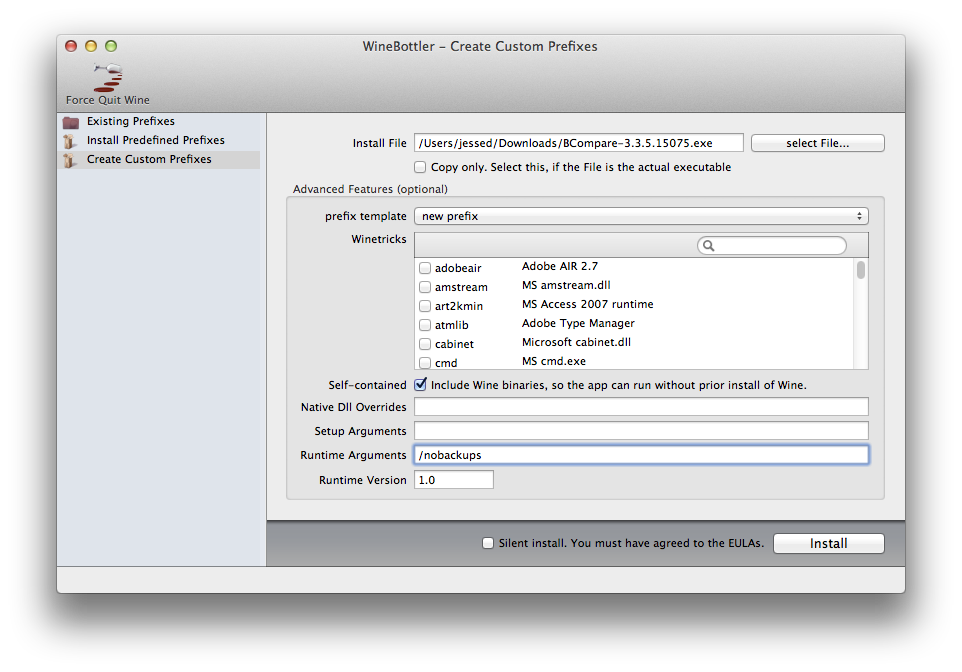
Click Install. It will ask you to save your App, do so in /Applications. I named mine as BeyondCompare.app and paths later will reflect this.
Follow the installer. After the installer completes Beyond Compare may pop up if you've left the launch checkbox checked. Just close the window. Choose BCompare.exe when it asks you for the default executable (BComp.exe is for batch scripting).
Git Configuration
The paths in the following presume you named your app BeyondCompare.app so these may be adjusted as necessary.
Add the following to your ~/.gitconfig file. Remove anything existing that contradicts these settings. I've named the diff and merge tools bc3wb as git already has baked in support for the Windows version, which it calls bc3.
Beyond Compare 3 Professional
[diff]
    tool = bc3wb
[difftool "bc3wb"]
    cmd = /Applications/BeyondCompare.app/Contents/MacOS/WineBottlerStarter \"$LOCAL\" \"$PWD/$REMOTE\"
[merge]
    tool = bc3wb
[mergetool "bc3wb"]
    cmd = /Applications/BeyondCompare.app/Contents/MacOS/WineBottlerStarter \"$PWD/$LOCAL\" \"$PWD/$REMOTE\" \"$PWD/$BASE\" \"$PWD/$MERGED\"
    keepBackup = false
    trustExitCode = false
Beyond Compare 2 / 3 Standard
[diff]
    tool = bc3wb
[difftool "bc3wb"]
    cmd = /Applications/BeyondCompare.app/Contents/MacOS/WineBottlerStarter \"$LOCAL\" \"$PWD/$REMOTE\"
Note: I am unable to get the mergetool portion working in Beyond Compare 2 or 3 Standard as WineBottler is interpreting /savepath= as a filepath and converting it to z:\savepath= rather than properly passing the arguments. If anyone has any advice on how to fix this I would be ecstatic.
Voila, now you can git mergetool and git difftool it up!
Comment by: Tom Oehser on
 You mentioned you had tried every other tool - have you tried the open source kdiff3 tool? I switched from Beyond Compare when I found that I was often having to work in environments where I couldn't get BC, but I've been happy.
Comment by: Kevin Roth on
 Had to install XQuartz, and do an initial run of Wine before it would let me set up BeyondCompare in WineBottler. Might be helpful info for other WineBottler noobs like me.
Comment by: Marco on
 Hi Jesse,
 your explanations work right out of the box – Thank you very much for sharing!
For further integration of the bottled Beyond Compare into Mac OS X, e.g. for text file comparison, use the following Automator workflow setup:
1. Open "Automator"
2. Create a new "workflow"-item
3. Choose "Run Shell Script" from Library and drag it to the right within Automator.
4. On top right (above the new dragged item) set 'Service receives selected' to "files or folders" from drop-down menu
5. In the same line set 'in' to "Finder.app" from drop-down
6. In the "Run Shell Script"-item on the right set 'Pass input' to "as arguments" from drop-down
7. Insert the following line to pass your selected files as quoted arguments to the bottled BeyondCompare and force to open them up in "Text Merge"-mode:
/Applications/BeyondCompare.app/Contents/MacOS/WineBottlerStarter "$@" --fileviewer="Text Merge"
8. Save your new Automator-workflow as "Compare Text Files" and close Automator.
9. Open Mac OS Finder and select two text files of your choice to compare
10. Choose "Compare Text Files" from context-menu and now they open up with Beyond Compare
Enjoy!
Comment by: wizmagister on
 Thanks a lot. This was very usefull.
 For those looking to compare network files/folders, they are accessible under Z:\Volume\...
First connect to the network folder in OSX. Good luck !
Comment by: Dorgo on
 Been trying to get this working on OSX 10.8, WineBottler 1.5.30, Beyond Compare 3.3.7.15876
Trying to run git mergetool I get:
/Applications/BeyondCompare.app/Contents/MacOS/WineBottlerStarter: No such file or directory
instead of WineBottlerStarter, there is a MacOS/startwine script instead. Swapping that out for WineBottlerStarter launches beycomp, but at the home screen 'Start New Session' instead of comparing the files.
Comment by: Rick on
 I wish I could get this to work with Git Tower... I can't even get it to open two files from the command line. It just opens with no files. For example, on the command line in a folder with 2 test text files:
open -n -a /Applications/BeyondCompare.app 'test.txt' 'test2.txt'
I don't have WineBottleStarter or startwine... I have X11 in there. and this:
open -n -a /Applications/BeyondCompare.app/Contents/MacOS/X11 'test.txt' 'test2.txt'
results in this error:
LSOpenURLsWithRole() failed for the application /Applications/BeyondCompare.app/Contents/MacOS/X11 with error -10810 for the files ....(path two the two files here)
At least I can use BC on the Mac now... I have tried a few compare tools and none of them actually function in a way that lets me merge files.
 You are a life saver !!
Comment by: Rob Munro on
 I'm having the same problem as Rick. I have had to use the X11 binary located at /Applications/BeyondCompare.app/Contents/MacOS/X11 but i can never get it to work without getting the same error that Rick spoke about "LSOpenURLsWithRole()".
Am I missing something?
 Great stuff!!! Didn't work if I didn't check the self contained box.
Comment by: Casey Gum on

Here's a more thorough set of instructions (Prezi Presentation) using the latest version of WineBottler...
http://prezi.com/k5pldg-oh9bt/
 They (just) released a first Mac OS demo version: http://www.scootersoftware.com/beta.php?zz=beta4_dl